view project

One Who Learns

Meta data

onewholearns.com is a language-learning platform for serious learners, starting with German for people who need B1 for citizenship or work. It replaces the textbook-plus-three-apps combo with an AI tutor, Pip, at the center. Pip has the learner's full context, dozens of learning tools, voice conversation practice, and memory. The web and iOS apps are live with a paid Premium tier.

Ask Claude about this case study Ask ChatGPT about this case study Markdown

Pip, the AI tutor

Pip, the AI tutor: a young child with curly brown hair in blue dungarees.
Problems

Problems

Apps were made for tourists, textbooks were made for paper, and everything else was scattered

  • Problem

    Apps are made for tourists

    Duolingo and apps like it teach phrases for a trip and keep you coming back with streaks. They don't take you through the grammar an exam tests.

    Solution

    A path from A1 to B1, with grammar and exercises for reading, listening, writing and speaking.

  • Problem

    Textbooks are made for paper

    The audio for a listening exercise was an mp3 on the publisher's website. Nothing worked on my phone.

    Solution

    An interactive course with the audio inside each exercise, on web and iPhone.

  • Problem

    Plain flashcards don't use visual memory

    A word and its translation on a card is rote repetition. I remember pictures better, and every German noun has a gender to remember too.

    Solution

    Visual flashcards where each word is a scene and the colour shows the gender.

  • Problem

    Reference tables are scattered

    Verb conjugations, articles, adjective endings: each one lived on a different website, PDF or textbook page.

    Solution

    Seven reference tables in one place.

  • Problem

    Grammar drills are scattered too

    Practice for one topic, like cases or articles, was spread across different sites and books.

    Solution

    Drills for articles, cases, verbs, word order, prepositions, pronouns, adjective endings and modal verbs.

  • Problem

    I wanted it all in one place

    Words, grammar, practice and my progress, on my laptop and on my phone.

    Solution

    One app on web and iPhone, plus a Chrome extension that saves words from any page.

Who it’s for

Who it’s for

Learners with a deadline over learners on holiday

  • First

    Citizenship applicant

    Has lived in Germany for years, works in English, and needs a B1 certificate for a passport. Sees a tutor once a week.

    Why First

    Most urgent need, a clear finish line, and the group I belong to.

  • Second

    Professional expat

    Works in English and gets by with survival German. No exam, but tired of feeling like a guest.

    Why Second

    High intent, but no deadline to keep them going.

  • Second

    Student

    Has a university place that asks for B1 or B2. Clear deadline, smaller budget.

    Why Second

    Urgent and exam-driven, but pays less.

  • Later

    Heritage learner

    Grew up hearing German in the family and wants it back.

    Why Later

    Strong feelings, low urgency.

  • Later

    Curious learner

    Learning for a trip, a partner or for fun.

    Why Later

    The biggest group, but motivation fades fast and apps like Duolingo already serve them.

Decision
Build for learners with an exam to pass, starting with the B1 citizenship exam.
Why
They have the most urgent need and a finish line you can measure. I am this learner, so I could test the product on myself every day.
What I left out
Travellers and casual learners. There are more of them, but their motivation fades fast and the big apps already serve them.
How I checked
A customer journey map and an offer built from forum research and competitor apps in March. In September I read every answer new learners had given in onboarding to one question: why are you learning German?

What 62 new learners told me

Why are you learning German?

Why are you learning German? (relative bar length, percent of the longest bar)
Study100%
Work84%
No reason given84%
Citizenship or a visa63%
Family, partner or friends38%
Travel38%

62 answers from new learners, June to September 2026.

Day 2 retention, by the level they aimed for

Day 2 retention, by the level they aimed for (relative bar length, percent of the longest bar)
Aiming for B1100%
Aiming for A244%
Aiming for B2 or C128%

Learners who used the goal picker, September 2026.

Most of the users named an exam or a level, so the niche held.

Two things surprised me.

More people learn for study and work than for citizenship. And many aim for B2, one level above what the product teaches. Learners aiming for B1 came back the next day far more often than learners aiming higher.

So I kept the product at A1 to B1 and made the ceiling honest: you can pick B2 as your goal, and the app and Pip tell you what it can and can't take you to.

Architecture

Architecture

How Pip, the AI tutor, works

It took a few months of thinking, research, design and building to work out what the learning system should be. Three versions got it there.

V1

Tools

A set of tools for learners.

  • Vocabulary
  • Reference tables
  • Courses
  • Drills
  • Study plans
V2

A learning system

AI runs your study.

  • AI plans what you study next
  • Tools like Anki flashcards and grammar drills
  • AI writes new content when the library falls short
  • Planned from your learner context
  • A levelled library for reading, listening, writing and speaking
V3

AI tutor

The icing on the cake.

  • Pip: a tutor character and speaking companion
  • One log of mistakes and progress
  • More tools for Pip to manage your context and study
  • Memory notes, so each chat picks up where the last one ended

Learning system v3

ReadingListeningSpeakingWritingGrammarVocabularyClaude / ChatGPTtheir own AIMCP adaptersame toolsLook upread onlyWeb chatiOS chatPipTeaches from thecontext. Suggests thebetter step, once.Maketheir words + mistakesTask or sessionwith a “why”Card in chatToday listPracticedialog over the chatResultscore + missesProgressevery answerWeekly emailideaTHENCREATESOPENSREADS · NOTESREADSEVERY ANSWERADDS THE RESULTPIP REACTSWord memoryPlanPip’s notesLearning styleGoal + deadlineGap to goalLearner contextOne per learner, on the server.Loaded once per chat, then onlynew parts are added.SCORES FROM EVERY ANSWER4 skills2 blocksWeakest — gap to goal
Claude / ChatGPT their own AI
MCP adapter same tools
Web chat
iOS chat
Pip Teaches from the context. Suggests the better step, once.
Look up read only
Make their words + mistakes
Task or session with a “why”
Card in chat
Today list
Practice dialog over the chat
Result score + misses
Progress every answer
Weekly email idea · reads the learner context

Learner context

One per learner, on the server. Loaded once per chat, then only new parts are added.

ReadingListeningSpeakingWritingGrammarVocabulary
  • Word memory
  • Plan
  • Pip’s notes
  • Learning style
  • Goal + deadline
  • Gap to goal

SCORES FROM EVERY ANSWER

  • 4 skills
  • 2 blocks
  • Weakest — gap to goal
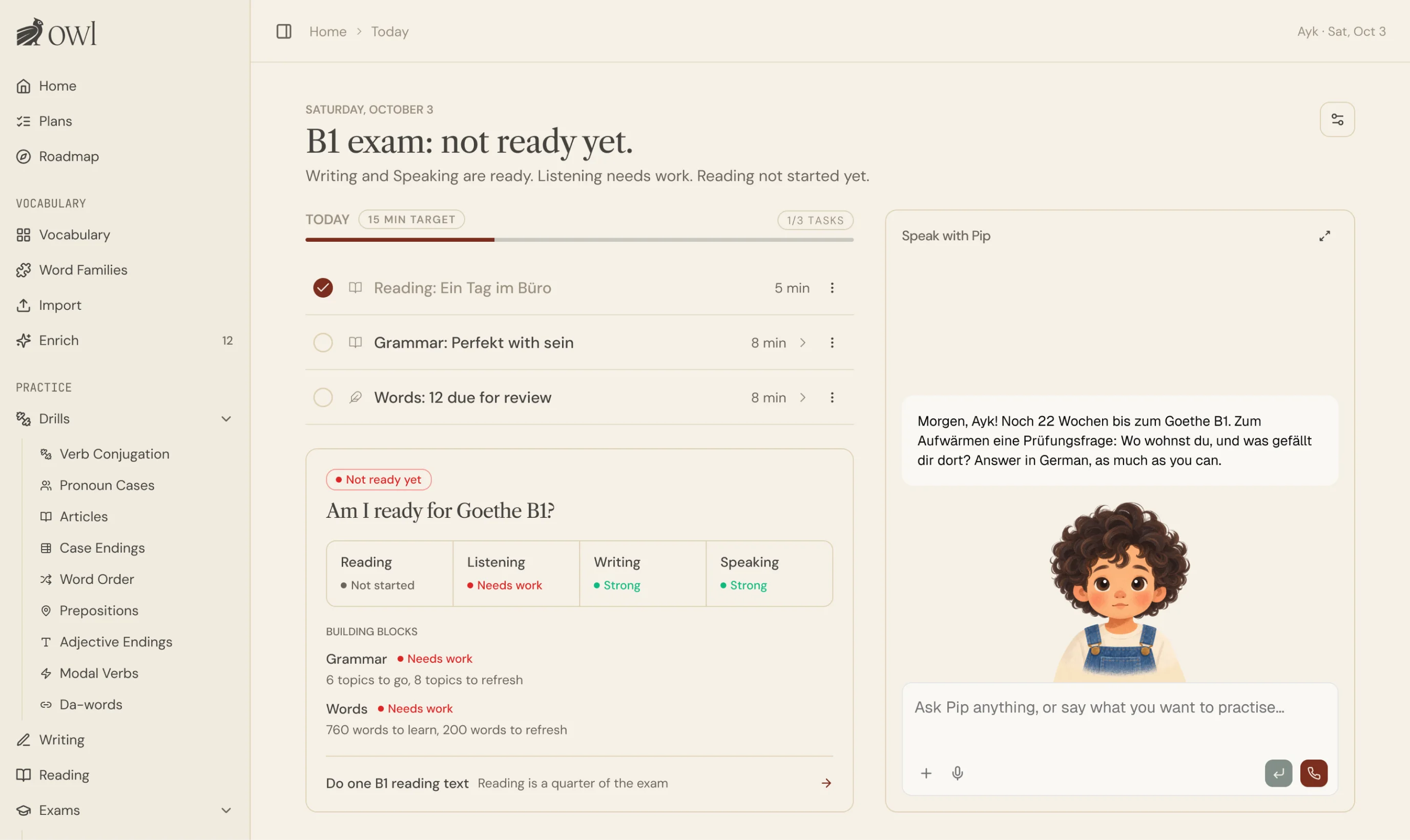
The One Who Learns Home screen. The headline reads “B1 exam: not ready yet.” Beside a list of three tasks for today sits an “Am I ready for Goethe B1?” card that rates Reading, Listening, Writing and Speaking. On the right, the “Speak with Pip” panel shows Pip’s greeting in German and a message box.
Home today: the exam-readiness answer first, today’s tasks, and Pip beside them.

Getting found


I built two ways to reach learners: search took four months to take off, and social media still hasn’t.

I funded this myself, so I chose channels that cost time instead of money. Search came first. The big apps rank for almost nothing about German grammar, vocabulary or exams, and people searching for those are already trying to learn. Social media came second, built from the same pictures as the flashcards.

Search pages

  1. Data

    Search Console, Bing and Ahrefs keyword data

  2. Plan

    Page types ranked by demand

  3. Pages

    Built from the word database

  4. Measure

    Clicks and signups feed the next plan

↺ feeds next plan

Social media

  1. Words

    The same database and pictures

  2. Five formats

    Word cards, phrase carousels, word sets, grammar scenes, der/die/das videos

  3. Review

    Every post checked and posted by hand

Built for Instagram and TikTok, with a renderer for each format. Nothing posts automatically.

Visitors by source

LAST 180 DAYS · 7-DAY AVERAGE

  • Organic search 345/day
  • Direct 212/day
  • Referral 34/day
  • AI assistants 15/day
  • Other 10/day

Bing moved first, in July. Google followed at the end of August, and by September the page with the 1,000 most common German words was on the first page of results. Social media started from zero followers and went out by hand when I had time, and it still sends only a few visitors a month. Search also brought a problem I didn’t expect, which is the next part of the story.

The biggest challenge

The biggest challenge

Signups grew fast,
and most people never came back the day after

Search worked, and signups climbed through August and September. So I followed what new learners did after they signed up, step by step, through the product’s event log. Most of them stopped early. Few came back the next day.

How far the first signups got

  • Signed up 100%
  • Started setup 65%
  • Finished setup 45%
  • Started a lesson 26%
  • Finished a lesson 8%
The first 103 signups, August 2026. Share of signups reaching each step.

When learners came back after signing up

  • The next day 17%
  • Days 2 to 3 4%
  • Days 4 to 7 3%
  • Days 8 to 14 2%
400+ signups, April to September 2026. Share of signups, each learner counted once, at their first return.

What I found, and what I changed

  1. 01

    People came for a PDF

    The page that brought the most visitors was a free list of the 1,000 most common German words. Its visitors signed up four times less often than visitors to the home page. They took the list and left.

    WHAT I CHANGED

    The app now remembers what brought you in. People who came for words can start with words, or with Pip.

  2. 02

    The first day asked too much

    One learner went between the home screen and lesson 1 six times in three minutes. Over half of new learners never saved a single answer.

    WHAT I CHANGED

    Setup builds your plan and ends on your first task. Home leads with your goal and one row for today.

  3. 03

    Finishing setup went with coming back

    Learners who finished setup came back the next day about three times as often as those who skipped it.

    WHAT I CHANGED

    Pip now runs setup as a short conversation.

  4. 04

    Nobody heard from us

    A new learner got no email after signing up. And when reminders did exist, three in four of them went to people who had already stopped using the app.

    WHAT I CHANGED

    Emails on days 3, 7, 14 and 30, plus a next-day email from me to anyone who skipped setup. Reminders stop after two quiet weeks.

  5. 05

    Some people only need one job done

    Not everyone wants a course. Some people just need to check a word.

    WHAT I BUILT

    A dictionary: look up any German word in any form and save it in one tap. Over 100,000 entries.

THE STRATEGY

ListenRedesignNew betsExploration and experimentationLOOP

Retention isn’t solved yet. I work on it as a loop.

Each round starts with real learners and ends with something new to measure.

  1. 01

    Listen

    Talk to learners and watch session replays to see where they get stuck.

  2. 02

    Redesign

    Rebuild the parts that don’t work, one at a time.

  3. 03 ↺

    Make new bets

    Try new ideas, see what brings people back, and start again from 01.

Learning from users
“I don’t want to think about what I’m missing and what I’m good at. The system should care about that, not me. My mind should be free for learning.”
A LEARNER, IN INTERVIEW, SHARED WITH PERMISSION

Learning from users

I built the product on assumptions. Talking to users refuted some of them.


In July and August I emailed around 80 new learners and asked what they were learning for and what was missing. Some wrote back with requests. I booked calls with them.

Each shared the way they use the app and what’s missing from it. I’ve got lots of ideas and suggestions how the app can be improved further.

ASSUMPTION WHAT I LEARNED WHAT I CHANGED
ASSUMPTION A weekly plan, a daily goal and a daily email keep learners going.
WHAT I LEARNED The learners I spoke to did not use the plan or the dashboard. One said the daily email made him feel guilty about not studying.
WHAT I CHANGED Home now starts with today’s tasks and readiness answer. Daily emails are user context aware and tell the user what to focus on today, without putting a pressure.
ASSUMPTION Progress means words learned and lessons finished.
WHAT I LEARNED They wanted one answer: am I ready for the exam? One learner: “I don’t care how many words I memorize. I don’t know if I’m ready or not.” His driving test app told him when he was ready.
WHAT I CHANGED A readiness line already existed, at the bottom of the Roadmap page. He had never seen it. It is now a card on Home.
ASSUMPTION The app is the course.
WHAT I LEARNED Their course is a textbook in a classroom, or a tutor. The app is the tool beside it. One learner called my course section useless, because it didn’t follow the lesson he was on.
WHAT I CHANGED I had stopped scheduling course lessons a few days before the call. The call confirmed it. Personalized courses made by the AI tutor are on the roadmap.
ASSUMPTION A quiz should mix in new words to grow vocabulary.
WHAT I LEARNED They study the words from their current lesson and want to be quizzed on those, plus a few old ones. New words in the quiz looked like a bug.
WHAT I CHANGED First, I fixed the UX: you now choose a set of words first, then learn and quiz only that set. Later I replaced the whole Vocab workflow with one based on Anki.

What I took from it

Three of the four beliefs had the same shape: I had built something that asked learners to plan, track or choose. They had around 30 minutes a day and wanted to spend them on German. That changed the question I ask about every new screen. It used to be “what does this help you learn?”. Now it is also “what does this ask you to manage?”. It is also why the next section of this page is about a tutor and not about another feature.

Re-design

Re-design

When something doesn’t work, you either cut it or fix it, no matter how much effort you have put into it.


Flashcards have been the core of the app since the beginning. Visitors who tried them signed up far more often than visitors who downloaded a PDF: 5% against 0.9%. However, users did not come back to them. Four in ten flashcard sessions ended without a single card graded. It felt like users believed the promise, but it wasn’t fulfilled.

That’s when I started to examine the issue by looking at the usage data and replays. I discovered that the UX and UI I designed didn’t quite work. People would click through the slider and leave.

At that moment I thought: why not take a proven and popular mechanism, Anki, and improve its weaker sides by adding color coded visuals and core word information. I also added directionality, German to English and English to German, since recognising a word and producing it are two different skills.

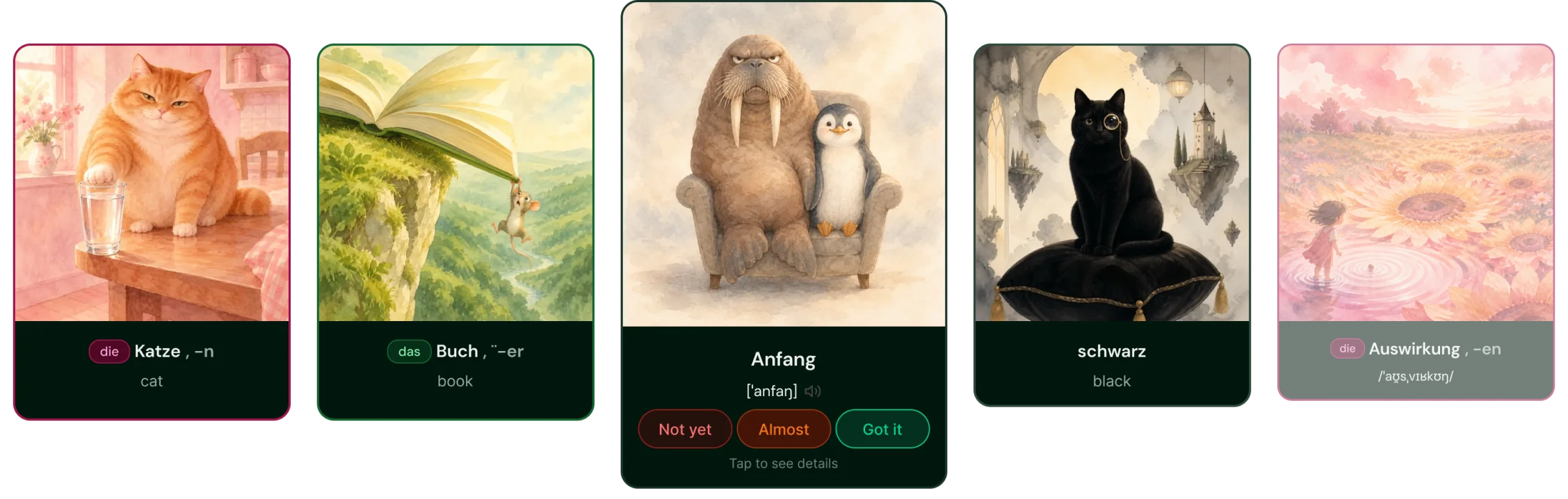
The first flashcard design: a horizontal swipe slider of illustrated cards. The centre card shows a walrus and a penguin in an armchair for the word “Anfang”, with Not yet, Almost and Got it grade buttons on the front. Neighbouring cards show “Buch” (book) and “schwarz” (black).
The first flashcards: a swipe slider with the grade buttons on the front. Users simply flip through it.
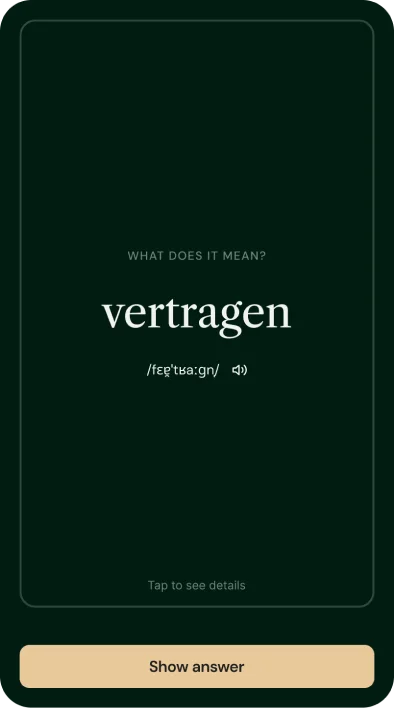
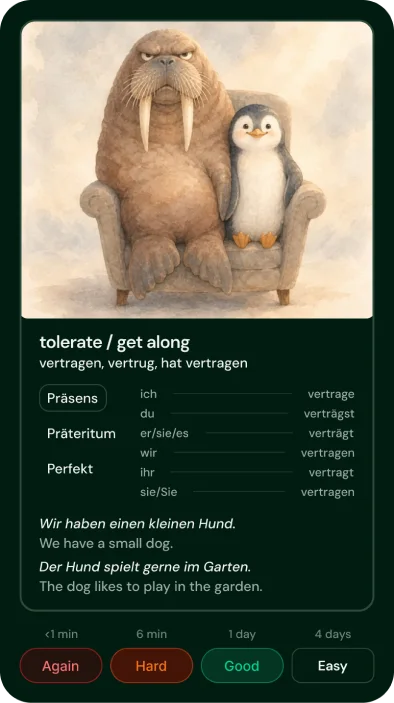
The redesigned flashcard, front: a dark green card with only the German word “vertragen” and its pronunciation, and a Show answer button. The redesigned flashcard, back: the walrus and penguin picture, the meaning “tolerate / get along”, verb conjugation tables, two example sentences and Again, Hard, Good, Easy buttons with review intervals.
The user has to make an effort to recall a word and only after that view the image. The combination makes the retention much better.
HYPOTHESIS
The images work but recalling words in a slider doesn’t.
IF TRUE
The share of sessions with at least one graded card goes up from 60%, and learners who grade cards come back the following week more often than before.
IF FALSE
Grading stays where it was. Then the problem is in the words or the pictures, and the next change is to the content.
WHEN I’LL KNOW
After 500 sessions on the new cards, around mid-November 2026.

The bet

The biggest bet: an AI tutor that knows your whole learning context


The best part of my own learning was my tutor. She looked at where I was and picked the exercises and grammar drills that fit. Whatever your goal, there is a fixed set of skills you need for it. A tutor who knows which ones you have and which you don’t can replace a fixed course. I built that tutor into the app and called it Pip.

It is the most expensive part of the product to run: every conversation costs model and voice minutes. And it has no usage data yet. That is what makes it a bet.

  • ALONE

    You don’t know what to do next

    WITH PIP

    Plans your week from your goal and weak spots, and tells you the next step.

  • ALONE

    You don’t know what’s wrong

    WITH PIP

    Reads every answer you’ve saved and finds the gap.

  • ALONE

    Nobody explains it

    WITH PIP

    Teaches by talking, then checks that you understood.

  • ALONE

    Nobody notices

    WITH PIP

    Remembers what you struggle with, and reacts when you slip or improve. You can see and edit what it remembers.

How Pip teaches

Explain another way
  1. 01 Know you goal · gap · memory · habits
  2. 02 Find the gap what blocks the goal now
  3. 03 Teach — talk explains, answers, lesson + word cards
  4. 04 Check a quick question in the chat Understood: on to practice. Not yet: explain another way, then back to teaching.
  5. 05 Practice drill · task · session
  6. 06 React sees the result, responds at once
  7. 07 Remember the context updates

First principles

  1. 01 The AI tutor knows you, and shows it Every suggestion names something true: the goal, the gap, a past mistake.
  2. 02 The conversation is the classroom Concepts are learned by talking, like with a real tutor.
  3. 03 Practice at the right moment After understanding, when asked, or when the goal needs it.
  4. 04 Never break the thread Practice opens over the chat and closes back into it.
  5. 05 The learner leads, the tutor guides Does what is asked; offers the better step once; asks before changing the plan.
  6. 06 Everything teaches Pip something Chat answers, drills, readings all update the context.
  7. 07 Pip learns how you like to learn Talk or drills? Watches which offers are taken.
  8. 08 One brain, many doors Web, iPhone, Claude / ChatGPT share context and tools.
  9. 09 A tutor is three parts Context + tools + instructions. German now; other subjects later.

The decisions behind it

  • Context is the product

    Without your history, Pip is a chatbot. Everything Pip says starts from your goal, your answers and your mistakes.

  • Exercises open inside the chat

    Pip starts in a chat, and exercises open inside the conversation. You never get sent somewhere else and lose your place.

  • Reuse before making new

    Pip uses the lessons, words and exercises that already exist before it writes anything new.

  • Do what’s asked, suggest once

    If you ask for something, Pip does it. If there’s a better next step, it says so one time.

  • Home works without AI

    Pip is the home screen, but the home screen loads without waiting for a model. The library stays for people who want to learn alone.

  • Voice as separate steps

    Talking to Pip runs as speech to text, then Pip, then text to speech. Voice minutes and credits have limits, and misuse gets warnings before a block.

HYPOTHESIS
Learners who start their day in the chat with Pip come back more often than learners who start on the library.
IF TRUE
More Pip users come back in their second week than library users. And they start more practice from the chat than from the library.
IF FALSE
Pip is a nice chat, but not a reason to come back. Then the next step is back to the retention loop, and Pip stays a helper inside it.
WHEN I’LL KNOW
After 50 learners have had Pip for four weeks, around December 2026.

What’s next

Next, I want more learners to stay and find the app invaluable in their learning journey.

  1. 01

    Solve retention

    Measure how many learners come back the next day and the next week, for the new setup, emails and flashcards.

  2. 02

    Polish

    Release the new flashcards and Pip together, as one update people can notice.

  3. 03

    Talk to learners

    More conversations like the one that led to import and Android. What do people actually use OWL for?

  4. 04

    Then grow

    Android on the Play Store. Pages for people learning for study and work, the two largest groups.

The product today

Everything above adds up to this.

Web and iPhone. One account. Your plan and progress follow you.

One Who Learns on an iPhone, showing a flashcard for the word Haltung, next to the web app showing the daily study plan. One Who Learns on an iPhone, showing a flashcard for the word Haltung, next to the web app showing the daily study plan.

A structured course, A1 to B1. Grammar explained in plain words, then exercises after every rule.

A course lesson in the web app: a grammar rule explained in plain words, followed by exercises. A course lesson in the web app: a grammar rule explained in plain words, followed by exercises.

Add any word. AI fills in the translation, a picture and an example sentence, and the word joins your reviews.

A word card with an AI-made translation, picture and example sentence. A word card with an AI-made translation, picture and example sentence.

Save words from any website. The Chrome extension translates as you read & sends new words to your deck.

The Chrome extension translating a word on a web page and sending it to the deck. The Chrome extension translating a word on a web page and sending it to the deck.

Every grammar table in one place. Articles, cases and verb forms, plus unlimited drills to make them stick.

Grammar tables for articles, cases and verb forms in the web app. Grammar tables for articles, cases and verb forms in the web app.
ChatGPT and Claude connected to the learner’s words and progress. ChatGPT and Claude connected to the learner’s words and progress.

Bring your own AI. Connect ChatGPT or Claude to your words and progress, and practise there too.

Unlimited grammar drills. Practise articles, cases, word order and verb forms until they stick.

A grammar drill in the web app, practising articles and cases. A grammar drill in the web app, practising articles and cases.